MOT history
Every UK vehicle on GarageHQ gets its full MOT history pulled from the DVSA's public test record automatically. You don't have to enter anything; the timeline appears as soon as you add the vehicle.
Where to find it
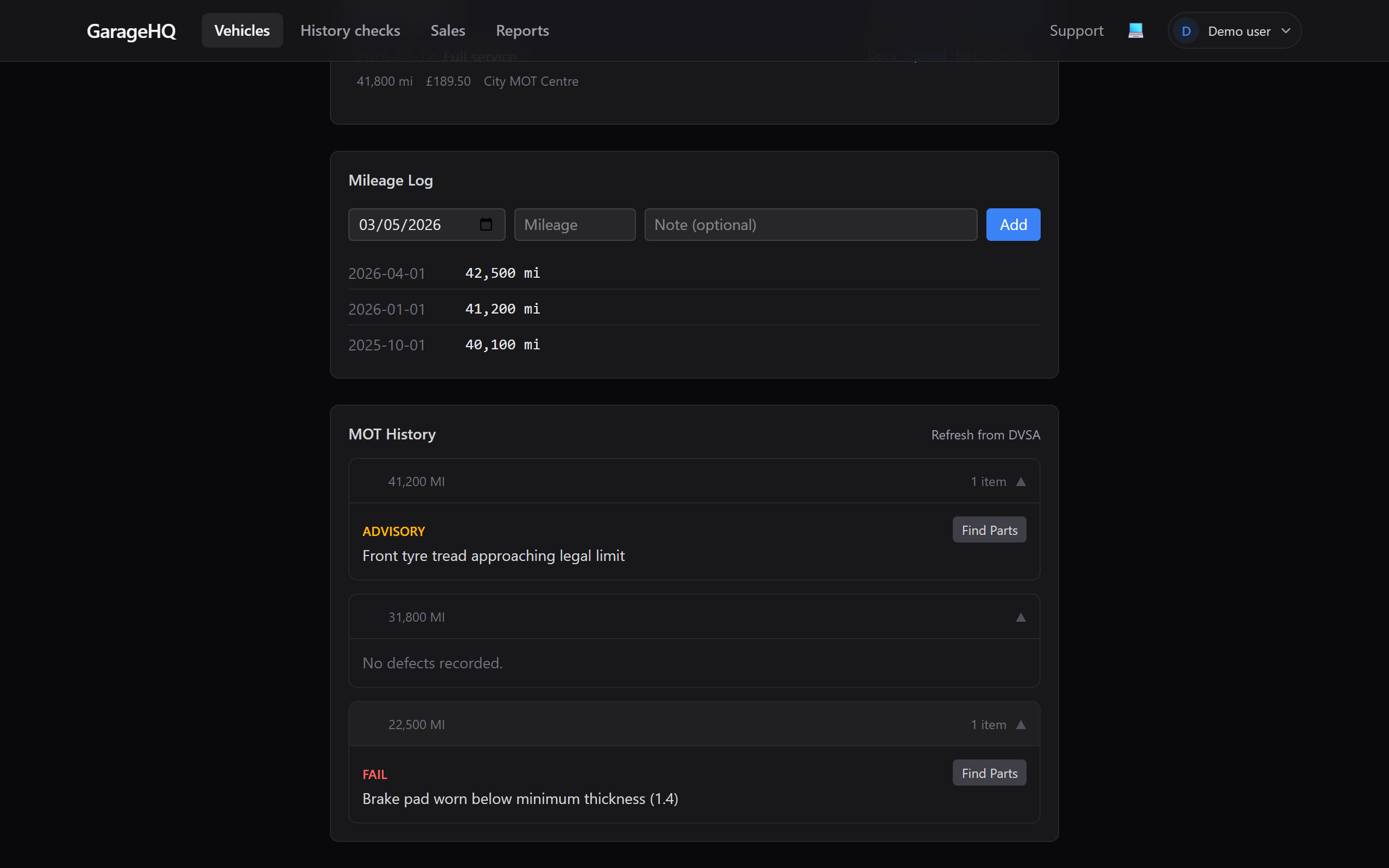
Open any vehicle's detail page and switch to the History tab. The MOT history section shows a vertical timeline of every test the DVSA has on record (alongside service history and mileage).
What's in each entry
Each row in the timeline carries:
- Test date in
DD MMM YYYYformat. - Result: pass, fail, or "pass with advisories".
- Mileage at test: what the tester recorded on the day. This is what feeds the mileage anomaly detector.
- Expiry: when the certificate is valid until (next test due).
- Advisories: items the tester noted as not yet a failure, but worth watching. Click into one to find priced replacement parts via Finding parts.
- Failure reasons (for failed tests): the specific defects that caused the fail.
How fresh is the data?
GarageHQ refreshes a vehicle's MOT history:
- On vehicle creation: first fetch happens when you add the vehicle.
- Daily: the reminder cron pulls fresh data for every vehicle as part of the morning sweep.
- On demand: opening the vehicle detail page triggers a refresh if the cached copy is more than 24 hours old.
The DVSA publishes new MOT results within a few hours of the test completing. So if a test was done today, expect the entry to appear in GarageHQ tonight or tomorrow morning.
What if a test is missing?
A few possibilities:
- The vehicle is too new. First MOT is at 3 years for cars, 1 year for many commercial classes. No test = no record.
- The test was done very recently. Wait 24 hours for the DVSA to publish.
- The vehicle is exempt. Some vehicles (historic, certain electric) don't need MOTs.
- DVSA outage. Rare but it happens. The timeline shows a stub message; refresh tomorrow.
If a test is more than 48 hours old and still missing, contact support. We can ask DVSA to confirm it's in their public record.
What if a result looks wrong?
The data we display is exactly what the DVSA publishes. We don't edit, score, or interpret it. If a result on your timeline doesn't match a paper certificate or your expectation:
- Look up the vehicle on the official DVSA service using the same reg.
- If the official site agrees with GarageHQ, the issue is with the test record at DVSA. Their helpline can correct genuine errors (e.g. wrong mileage entered).
- If the official site disagrees with GarageHQ, our cache is stale. Email us with the reg and we'll force a refresh.
What next?
- Mileage anomaly warnings, what triggers a flag when MOT mileages don't add up.
- Finding parts, turn an advisory into priced replacement parts.
- Service history and mileage, log non-MOT mileage readings yourself.